

What is Popeye?
Popeye is a free, open-source tool that scans a live Kubernetes cluster and reports problems with your resources and settings. Think of it as a linter for your running cluster.
It checks what is actually deployed, not the YAML files on your disk. It finds misconfigurations, unused resources, and missing best practices. If your cluster runs metrics-server, it also warns you when CPU and memory are over or under allocated.
Popeye is read-only. It never changes any of your Kubernetes resources. At the end of a scan, it gives your cluster a score from 0 to 100.
Popeye is made by Imhotep Software and is licensed under Apache 2.0.
To learn more, read the official Popeye docs, or explore more Kubernetes tools.
Why is it used?
Over time, a Kubernetes cluster collects many resources: pods, services, secrets, roles, and more. It is hard for a person to check all of them by hand.
Popeye checks them for you. You run one command, and it shows a clear report of what is wrong and how serious it is.
- Find misconfigurations in a running cluster
- Spot unused ConfigMaps, Secrets, and service accounts
- Check pods for probes, resource limits, and image tags
- Get a simple cluster score from 0 to 100
- Run it on your laptop, in Docker, or as a CronJob
- Safe to run, because it is read-only
What problem does it solve?
Kubernetes clusters drift. People make changes by hand, old resources stay behind, and some best practices get missed. Tools that only check YAML files on disk cannot see what is really running.
These small problems add up. They waste resources, leave security gaps, and can cause outages later.
How does it work?
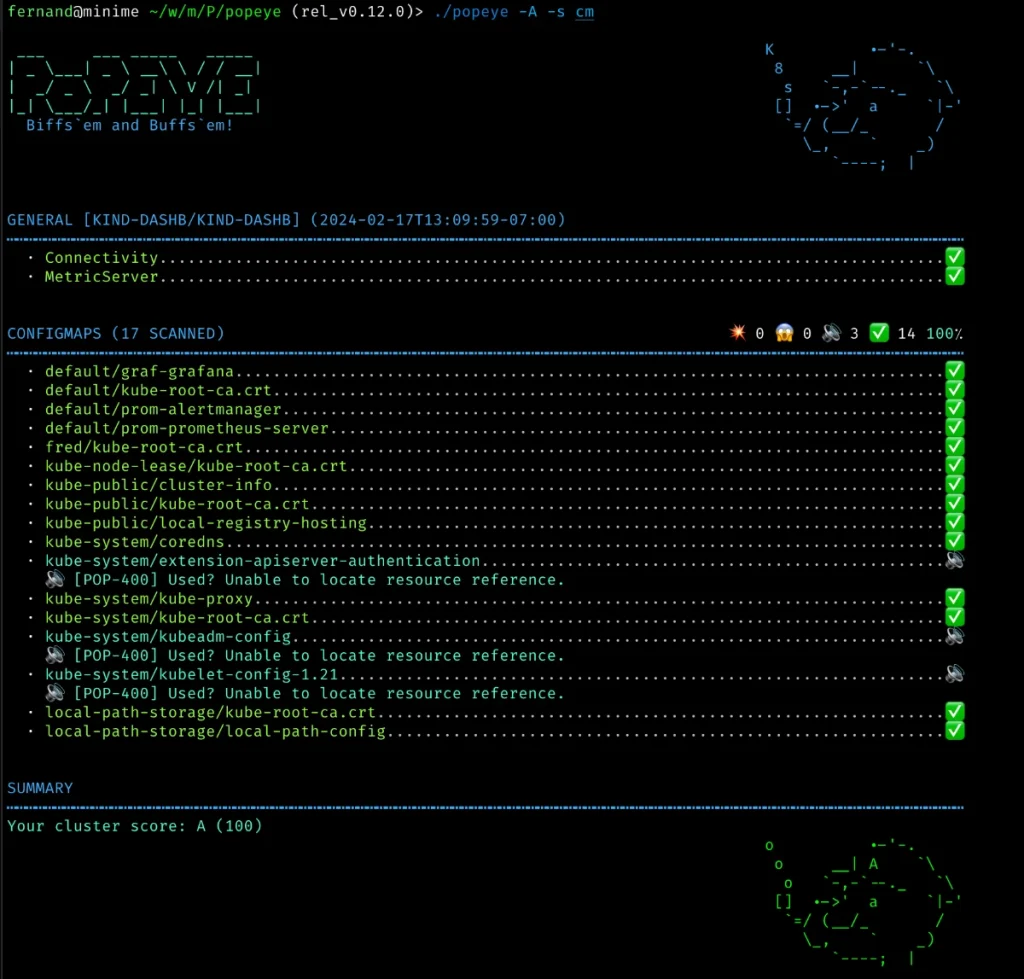
(Official Popeye scan report in the terminal, ending with a cluster score.)
How Popeye works:
1. You run popeye. It reads your kubeconfig and connects to the Kubernetes API.
2. It reads (get and list only) the live resources: nodes, pods, services, secrets, RBAC, and more. If metrics-server is installed, it also reads CPU and memory usage.
3. It runs a linter for each resource type and checks it against best practices. You can tune the checks with a spinach.yaml config file.
4. It prints a report like the one above. Each issue is marked OK, Info, Warn, or Error, and the cluster gets a score from 0 to 100. You can also save the report as HTML, JSON, YAML, or JUnit, upload it to S3, or push metrics to Prometheus.
Popeye only reads. It never changes your cluster.
Key features of Popeye
Everything Popeye checks to keep your cluster clean and healthy.
- Live cluster scanChecks what is really running, not YAML files on disk.
- Pod checksFinds missing probes, missing limits, and latest or untagged images.
- Unused resourcesSpots unused ConfigMaps, Secrets, service accounts, PVs, and roles.
- Service checksChecks endpoints, matching pod labels, and named ports.
- RBAC checksFinds unused ClusterRoles, Roles, and their bindings.
- Resource usageWarns about CPU and memory over or under use, with metrics-server.
- Spinach configTune limits and skip resources or codes with one YAML file.
- Many report formatsConsole, HTML, JSON, YAML, JUnit, Prometheus, or just a score.
- Prometheus metricsPush scan results to a Pushgateway and view them in Grafana.
- Save to S3Upload reports to AWS S3 or MinIO.
- Runs as a CronJobScan your cluster on a schedule from inside the cluster.
- Read-onlyPopeye never changes any of your resources.
Advantages and limitations
Advantages
- Free and open source (Apache 2.0)
- Read-only, so it is safe to run on any cluster
- Scans the live cluster, not just files on disk
- One command gives a clear report and a cluster score
- Many output formats for CI pipelines and dashboards
- Runs on Linux, macOS, Windows, Docker, or in the cluster
Limitations
- Checks a fixed list of Kubernetes resource types, not every CRD
- CPU and memory checks need metrics-server
- Needs get and list RBAC access on many resources
- Exits with an error code when it finds errors, so CronJobs need --force-exit-zero
- The docs say it may break on older Kubernetes versions
- It only reports problems; it does not fix them for you
Popeye FAQ
What is Popeye?
Popeye is a free command-line tool that scans a live Kubernetes cluster and reports misconfigurations, unused resources, and best-practice issues.
Does Popeye change my cluster?
No. Popeye is read-only. It only reads (get and list) resources and never changes them.
How do I install Popeye?
On macOS or Linux, run brew install derailed/popeye/popeye. You can also use go install github.com/derailed/popeye@latest, download a binary from the GitHub releases page, or run the Docker image quay.io/derailed/popeye.
How do I scan all namespaces?
Run popeye -A. To scan only one namespace, run popeye -n my-namespace.
What is the Popeye score?
After a scan, Popeye gives the cluster a score from 0 to 100 based on the issues it found. Use popeye -o score to print only the score.
Can I run Popeye inside the cluster?
Yes. You can run it as a Job or CronJob with a service account that has get and list access. Add --force-exit-zero so the pod does not end in an error state.
How do I skip some resources or checks?
Use a spinach.yaml file with popeye -f spinach.yaml. In it, you can exclude namespaces, resources, labels, or issue codes.
Is Popeye free?
Yes. Popeye is open source under the Apache 2.0 license.