What is Radar?
Radar is a free, open-source web UI for Kubernetes. It shows you what is broken in your cluster, why it broke, and what changed.
Radar is a single binary. You run it on your laptop with one command (kubectl radar), and it opens in your browser. It talks to the Kubernetes API using your kubeconfig. You do not need to install anything inside the cluster.
Radar also has a built-in MCP server. This lets AI agents like Claude Code, Codex, and Cursor read the same cluster data and help you find problems faster.
Radar is built by Skyhook (Y Combinator W23) and is licensed under Apache 2.0.
To learn more, read the official Radar docs, or explore more Kubernetes tools.
Why is it used?
A Kubernetes cluster has many moving parts. When something breaks, you often run many kubectl commands to find the cause.
Radar puts everything in one place. You see the broken resource, the resources around it, its events and logs, and what changed. So you find the problem faster.
- See what is broken right now in one ranked list
- See how resources connect on a live topology map
- Track every change on a timeline, with diffs
- Manage Helm releases, Argo CD and Flux apps in one place
- Let AI agents read your cluster through a built-in MCP server
- Runs on your laptop, with nothing to install in the cluster
What problem does it solve?
Debugging Kubernetes with only kubectl is slow. You jump between pods, events, logs and YAML, and you have to guess what changed. Many dashboards also need agents or extra setup inside the cluster.
AI agents have the same problem. With raw kubectl, they waste time and context reading long YAML output.
How does it work?
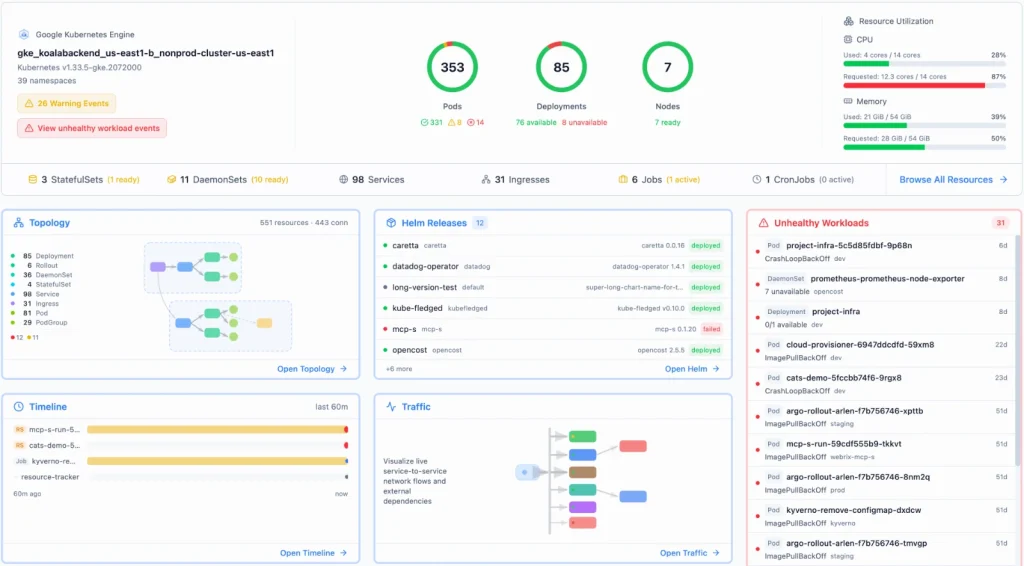
(Official Radar home screen: cluster health, topology, Helm, timeline, traffic and unhealthy workloads.)
How Radar works:
1. You run kubectl radar. Radar reads your kubeconfig, so it uses your own access to the cluster.
2. It reads and watches the Kubernetes API using informers. Then it builds one live model of the cluster: resources, how they connect, health, events, and changes.
3. It opens a web UI in your browser (port 9280 by default), like the screen above, and keeps it updated live.
4. On the same port, it runs an MCP server. AI agents connect to the /mcp-readonly endpoint and read the same cluster data.
Radar is one Go binary. You can run it on your laptop as a kubectl plugin or desktop app, or inside the cluster with a Helm chart. Your cluster data stays on your machine.
Key features of Radar
Everything you need to see and fix problems in a Kubernetes cluster, in one tool.
- IssuesA ranked list of what is broken now, like crash loops and failed rollouts.
- TopologyA live graph that shows how pods, services and other resources connect.
- TimelineEvents and resource changes in one timeline, with diffs of what changed.
- Resource browserBrowse all resources, including CRDs, with YAML, logs and events.
- HelmView, diff, upgrade, roll back or uninstall Helm releases.
- GitOpsMonitor, sync and fix Argo CD and Flux apps from one screen.
- Live trafficSee traffic between services using Hubble, Istio, Caretta or Beyla.
- Cluster audit48 best-practice checks for security, reliability and efficiency.
- MCP serverAI agents read cluster data through a read-only MCP endpoint.
- AI investigationsRun an investigation with Claude Code, Codex, Cursor or OpenCode.
- Access controlSee what any ServiceAccount or user can actually do.
- Upgrade impactCheck what may break before you upgrade Kubernetes.
Advantages and limitations
Advantages
- Free and open source (Apache 2.0)
- Single binary, with nothing to install in the cluster
- No account needed, and cluster data stays on your machine
- Works on EKS, GKE, AKS, kind, minikube, k3s and any conformant cluster
- Built-in MCP server for AI agents
- Fast on large clusters, with live updates
Limitations
- Timeline history is kept in memory by default and is lost on restart, unless you use SQLite or Postgres
- The traffic view needs Hubble, Istio, Caretta or Beyla
- Cost and metrics views need Prometheus or OpenCost data
- AI investigations need an agent CLI and do not run in in-cluster installs
- Hosted multi-cluster views for teams need the paid Radar Cloud
Radar FAQ
What is Radar used for?
Radar is a web UI for Kubernetes. It helps you see what is broken in a cluster, why it broke, and what changed.
Is Radar free?
Yes. Radar is open source under the Apache 2.0 license, and every feature in the docs is in the free version. Radar Cloud is a separate, hosted option for teams.
How do I install Radar?
Run curl -fsSL https://get.radarhq.io | sh and then run kubectl radar. You can also install it with Homebrew (brew install kubectl-radar), Krew, Scoop, the desktop app, or a Helm chart.
Do I need to install anything in my cluster?
No. Radar runs on your laptop and talks to the Kubernetes API with your kubeconfig. If your team wants shared access, you can also deploy it in the cluster with Helm.
How do I connect Radar to Claude Code?
Start Radar, then run: claude mcp add --transport http radar http://localhost:9280/mcp-readonly. The read-only endpoint has no write tools.
Does Radar send my cluster data to the cloud?
No. Radar keeps cluster data on your machine, and usage reporting is off unless you opt in. If you connect an AI agent, the agent sends what it reads to its own model provider.
Which Kubernetes clusters does Radar support?
Radar works with GKE, EKS, AKS, minikube, kind, k3s, and any conformant Kubernetes cluster.