

What is Kubetail?
Kubetail is a free, open-source logging dashboard for Kubernetes. It lets you watch logs in real time, in your browser or in your terminal.
It is made for workloads with many containers. When a Deployment or DaemonSet runs many pods, Kubetail merges the logs from all of them into one timeline, in time order. It also follows pods as they start, stop, or get replaced, so you do not lose track of a request.
Kubetail reads logs through your cluster’s Kubernetes API. You do not need to send your logs to an outside service, so your data stays with you.
You use it through the kubetail CLI. It is licensed under Apache 2.0.
To learn more, read the official Kubetail docs, or explore more Kubernetes tools.
Why is it used?
With kubectl logs, you usually see one pod at a time. When an app runs many pods, you have to open many terminals and match the times by hand.
Kubetail shows the logs from all pods of a workload in one place, live. You can filter them and follow them easily, in a clean web UI or in your terminal.
- Tail logs from all pods of a workload in one timeline
- Watch logs live in your browser or your terminal
- Filter by workload, time range, node properties, or grep
- Logs stay in your cluster, with no outside service
- Switch between clusters when you run it on your desktop
- Run it on your desktop, in the cluster, or in Docker
What problem does it solve?
Kubernetes pods are short-lived. They restart, scale up and down, and get replaced. When one user request moves across several pods and services, following its logs with kubectl is hard.
Many logging tools solve this by sending all logs to an outside system. That costs money, needs setup, and moves your data out of the cluster.
How does it work?
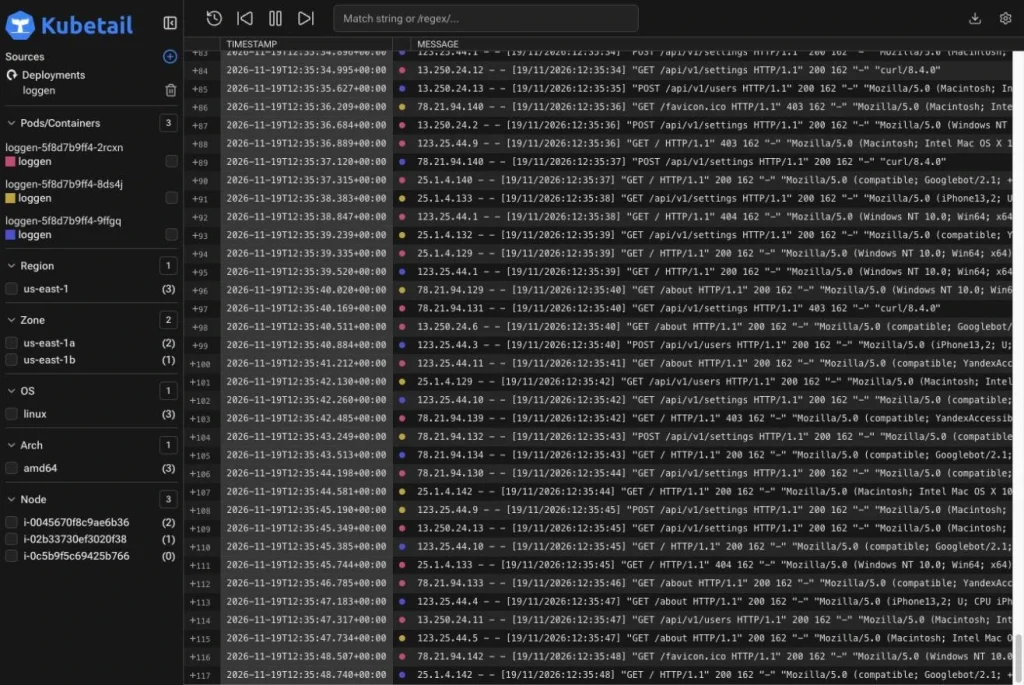
(Kubetail live demo: logs from three pods merged into one timeline.)
How Kubetail works:
1. You install the kubetail CLI and run kubetail serve. It uses your kubeconfig, so it has the same access as kubectl.
2. The CLI starts the Dashboard Server on your machine and opens the web UI in your browser.
3. The Dashboard Server asks the Kubernetes API for the logs of each container in the workload. The kubelet on each node reads the log files and streams them back.
4. Kubetail merges the streams into one timeline, in time order, and sends them to your browser live. It also watches pod events, so new pods join the timeline as they start.
For more features, run kubetail cluster install. This adds the Kubetail API: a Cluster API and a Cluster Agent on each node. Logs are then read straight from the nodes, and you get extras like log search and log file sizes.
To see logs in your terminal instead, run kubetail logs -f deployments/my-app.
Key features of Kubetail
Everything you need to follow Kubernetes logs live, in one place.
- Real-time tailingSee new log lines the moment they are written.
- Merged timelineLogs from all containers of a workload in one time-ordered view.
- Web dashboardA clean, easy UI that runs in your browser.
- Terminal modeStream logs in your terminal with kubetail logs.
- Filter by workloadPick a Deployment, CronJob, StatefulSet, and more.
- Time range filterShow logs from an absolute or relative time range.
- Node filtersFilter by availability zone, CPU architecture, node ID, and more.
- GrepFind the log lines that match a word or a regex.
- Private by defaultUses your Kubernetes API, so logs never leave your control.
- Multi-clusterSwitch between clusters when you run it on your desktop.
- Run anywhereOn your desktop, inside the cluster with Helm, or in Docker.
- Kubetail API (optional)Adds log search, log file sizes, and last event times.
Advantages and limitations
Advantages
- Free and open source (Apache 2.0)
- Works out of the box, with no log shipping or extra storage
- Logs stay in your cluster, private by default
- Merges logs from many pods into one easy timeline
- Has both a web UI and a terminal tool
- Easy to install with Homebrew, Krew, Winget, and more
Limitations
- It reads logs from the cluster nodes and does not keep a long-term log history
- Log search and log file sizes need the optional Kubetail API in the cluster
- In default mode, each container you tail keeps an open connection to the Kubernetes API server
- Switching between clusters works only on the desktop
- Some features, like node system logs, are still on the roadmap
Kubetail FAQ
What is Kubetail?
Kubetail is a free, open-source logging dashboard for Kubernetes. It shows logs from all the containers in a workload in one real-time timeline, in your browser or terminal.
Is Kubetail free?
Yes. Kubetail is open source under the Apache 2.0 license.
How do I install Kubetail?
Run brew install kubetail, or use the install script: curl -sS https://www.kubetail.com/install.sh | bash. It is also available with Krew, Winget, Snap, Scoop, and other package managers.
How do I open the web dashboard?
Run kubetail serve. It starts the dashboard on your machine and opens it in your browser.
How do I view logs in my terminal?
Run kubetail logs -f deployments/my-app to follow the logs of a Deployment in your terminal.
Does Kubetail send my logs to an outside service?
No. Kubetail reads logs through your cluster's Kubernetes API, so your logs stay with you.
What is the Kubetail API?
It is an optional set of services you add with kubetail cluster install: a Cluster API and a Cluster Agent on each node. It unlocks features like log search, log file sizes, and last event times.
Can I run Kubetail inside my cluster?
Yes. You can install it with Helm or YAML manifests and open it with kubectl port-forward, kubectl proxy, or an ingress. It also runs in Docker.
Is there a demo?
Yes. You can try the official live demo at demo.kubetail.com.